What HAM is
HAM manages hardware across offices: what is available, who has it, when it is due back and what needs attention. It covers the full physical lifecycle, from the first request to the final return or disposal.
Employees reach HAM through Jeeves, the digital workplace chat concierge, to find, request and manage equipment. IT and asset teams use the HAM web workspace to manage stock, fulfil requests and handle loans, returns, offboarding, audits and disposals. Both use the same records and rules.
The value: employee convenience and asset accountability together, with requests, physical movements and employee responsibilities connected throughout the equipment lifecycle.
One lifecycle, two ways to work
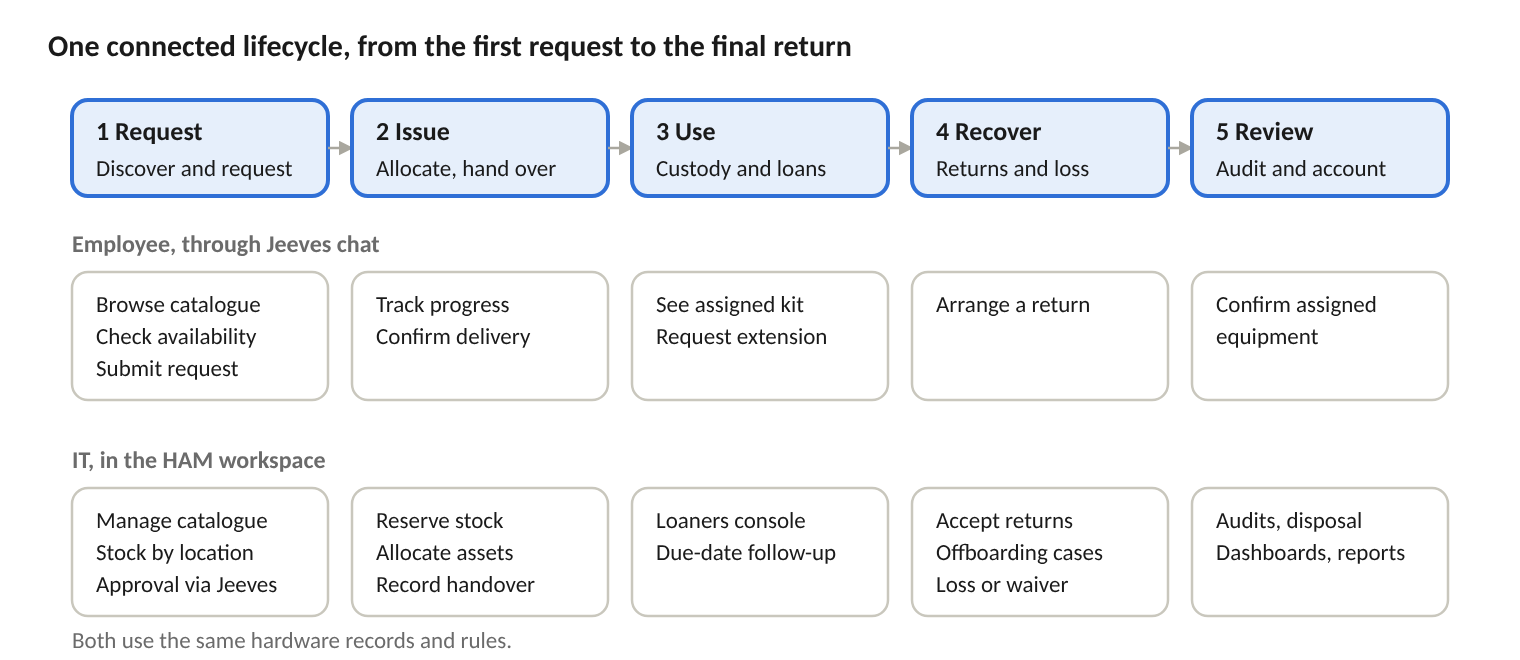
| Employee, through Jeeves | Administrator, in HAM |
|---|---|
| Find a model and fulfilment location | Maintain the catalogue and stock at each location |
| Submit and track a hardware request | Review request progress and allocate equipment |
| Confirm delivery and arrange a return | Record handover and receive returned equipment |
| Request more time on a loan | Monitor loan dates, returns and extensions |
| See assigned hardware | Review employee custody and offboarding cases |
What it does
Employees browse the catalogue, compare models, check availability at their location and request equipment in the Jeeves chat. They give quantity, delivery details and business justification, and see a preview before they submit. Afterwards they can track progress, cancel eligible requests, confirm delivery, arrange returns and ask for loan extensions.
Serial-tracked assets and quantity stock in one inventory. Each model is set to be tracked individually or by quantity, returnable or not, and loan-eligible or not. Existing assignments keep the terms they were issued under when a model’s settings change.
Stock by office or fulfilment location, showing units on hand, units reserved and units available. Adjustments and transfers are recorded with reasons. Asset tags and print support help identify equipment physically. Any filtered view can be exported to Excel.
Each request holds the equipment, quantity, location, delivery details and justification in one record. Approvals run through the Jeeves approval service. Specific assets or reserved quantities are allocated before handover, and both local handover and remote delivery with receipt confirmation are supported. Approved requests still waiting for stock stay visible.
Loans of 1 to 365 days. The loan period starts at handover or confirmed receipt, not at approval. Extensions are requested with a reason, approved through Jeeves and added to the due date with full history. A dedicated Loaners console groups loans by request and status: awaiting stock, pending receipt, due soon, overdue, extension pending and return pending.
A clear view of what each employee holds and what must come back. Items that stay with the employee are marked "No return required". Partial returns of quantity items are tracked unit by unit, and pending and completed returns are kept separate.
A dedicated offboarding case brings together all outstanding hardware for a departing employee, both serial assets and quantities. Equipment that cannot be recovered is recorded as a loss or waiver with a reason, giving a clear basis for closing the case.
Named audit campaigns cover individual asset checks and quantity counts in the same exercise. Findings are classed as missing, misplaced, quantity variance or recorded loss. Quantity differences are reconciled with a reason and a movement reference, and final results are kept for later review.
Campaigns target a location, category or model. Each employee receives a summary of the equipment recorded against them and confirms it through Jeeves. An Excel snapshot of the campaign is kept.
Disposal starts from retired assets and moves through draft, approval, disposed or cancelled. The record holds the vendor, the handover between people and the sanitisation method (wipe, degauss, shred or factory reset). A Disposal & Sanitisation Certificate can be printed, the disposal register exported to Excel, and completion notifications sent.
An operational dashboard covers stock, loan obligations and exceptions such as audit variances, overdue loans, pending returns and requests waiting for stock. Each exception links to the work needed. Administrators can ask reporting questions in plain English, see tables and charts, save questions, export to Excel, and get AI-assisted audit summaries as PDF.
Categories, models, locations and a list of banned models with reasons. Employee actions are tied to their company identity, and administrator access is role-based. Previews, approvals, recorded handovers and return and loss history keep everyone accountable.
What sets HAM apart
Most asset tools are registers for IT. HAM connects the employee’s request to the physical equipment and the person responsible for it, at every step of the lifecycle.
Hardware requests start where employees already ask for help. HAM is built into Jeeves, the digital workplace chat. Employees request, track, confirm, return and extend equipment in a conversation, while IT works in a dedicated workspace on the same records and rules.
Laptops, loaners and everyday supplies in one inventory. Serial-tracked assets and quantity stock live side by side, each governed by its own tracking, return and loan rules. Terms are fixed at the time of issue, so a later policy change never rewrites what an employee is responsible for.
Every request is linked to the equipment actually issued. Units are allocated before handover, and approval, allocation and physical receipt are tracked as separate steps. Teams can see what has been decided, what is reserved and what has actually reached the employee.
Loans that are fair and enforceable. The loan clock starts when the employee receives the equipment, not when the request is approved. Extensions are approved and added to the record, and the Loaners console shows each loan’s status by due date.
Audits that explain the gap, not just count it. Missing, misplaced, quantity variance and recorded loss are distinct findings, each with its own follow-up. Stock corrections carry a reason and a movement reference, and an AI-assisted summary turns findings into a management discussion.
Employees take part in keeping records right. Confirmation campaigns ask employees to review the equipment recorded against them through Jeeves, alongside physical audits.
Accountability through to end of life. Disposal is approved, records the sanitisation method and the handover between people, and produces a printable certificate and an Excel register, so the organisation can explain what left service and how.
Who it is for
| Role | What they gain |
|---|---|
| Employees | One familiar place in Jeeves to discover hardware, ask for it and manage it after issue. |
| IT and asset teams | Dedicated workspaces for inventory, requests, loaners, offboarding, audits, disposals and operations, with exceptions surfaced on one dashboard. |
| IT and Operations leaders | A clear view of how equipment is distributed and used, outstanding returns and loans, and audit discrepancies, with reports and Excel exports for reviews. |
Measuring the value
Track the outcomes that matter in your own operation, before and after rollout:
Time from request to handover
Outstanding and overdue loans
Time to process returns
Audit discrepancies and how quickly they are resolved
HAM covers the physical hardware lifecycle. Procurement, accounting, payroll and full maintenance management stay with your specialist business systems. Connected services depend on configuration. Disposal documents record the declared sanitisation method; they do not independently certify that a physical treatment was carried out.