What Jeeves is
Jeeves is the digital workplace concierge and the central gateway to every product in the IPDigital portfolio. Employees reach hardware, software, documents, business data, approvals and service requests through one chat, instead of learning a different portal for each product.
Behind the conversation, Jeeves provides shared enterprise services that every product reuses: verified employee identity, policy-checked access to tools, structured forms, explicit confirmations, human approvals, email, ticketing and scheduled reporting. Each product keeps full authority over its own records and decisions.
The value: one familiar place for employees to get things done, far less repeated build work for product teams, and identity, decisions and progress that stay connected and traceable across the whole portfolio.
One gateway for the whole portfolio
Every product in the portfolio talks to employees through Jeeves. Instead of each product building its own assistant, chat window, sign-in, approval flow and notification engine, products plug into Jeeves and inherit a complete conversational experience. Employees learn one place; product teams build only what is specific to their domain.
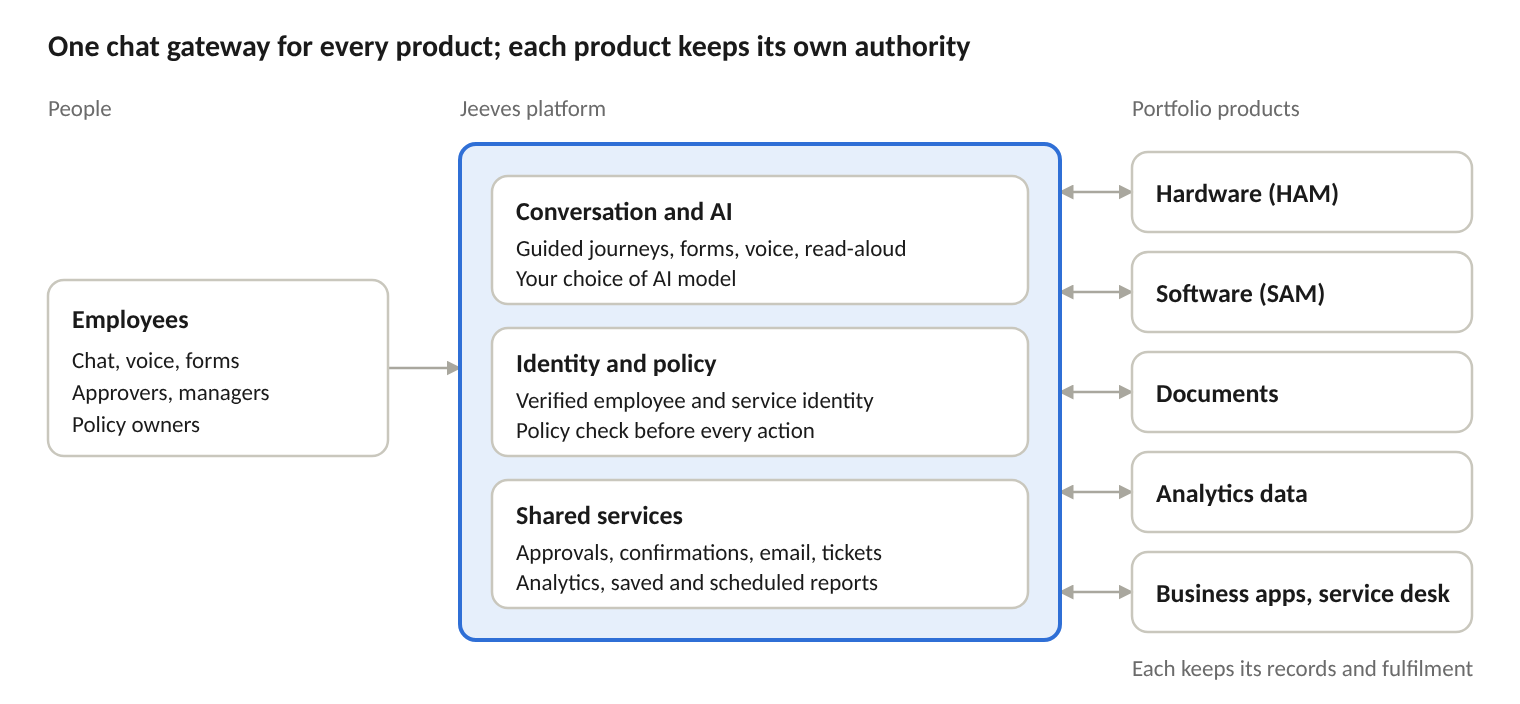
How a product joins the gateway
Publish its operations as tools. Searches, record views, requests and actions are exposed through the Model Context Protocol (MCP) or an established integration, each with defined inputs and results.
Map them to the conversation. Configured intents, prompts and flow rules decide which tools are available at each stage of a journey. Journeys are adjusted in reviewed configuration, not by changing the shared platform code.
Supply forms and outcomes. The product provides its form schemas and validation; Jeeves presents them in chat, binds them to the employee and checks them before submission.
Receive verified context. Every call carries the authenticated employee, the calling service and request correlation. Identity is set by the server, never by the AI or the browser.
Reuse shared services. Approvals, confirmations, email, tickets and reports are available to the product inside a chat or directly from its own workflows.
What every product gets, and what it keeps
| Jeeves provides to every product | Each product keeps |
|---|---|
| Conversation, intent routing and multi-step context | Its catalogue, records and business rules |
| Voice input, translation and read-aloud | Its own workspace for specialist teams |
| Structured forms, tables, charts and scanned uploads | Form definitions and domain validation |
| Verified employee and service identity | Its own permission, ownership and membership checks |
| Policy evaluation before every action | The meaning of each request and which operations are valid |
| Exact-term confirmations and human approvals | How a decision is applied, and the fulfilment itself |
| Email, ticketing and scheduled reporting | Business receipts and fulfilment status |
| A choice of AI models, managed once | Accuracy of its domain data |
Products connected through the gateway
| Product | What employees can do through Jeeves |
|---|---|
| Hardware asset management (HAM) | Browse the equipment catalogue and model details, check availability by location, request equipment, track requests, view assigned devices, confirm deliveries, arrange returns and ask for loan extensions. |
| Software asset management (SAM) | Search the software catalogue, view product details, see assigned licences and resources, track request and ticket status, and confirm whether software is still needed. |
| Document management | Browse, search and ask questions of the documents they are permitted to see. Administrators manage metadata and classification. |
| Analytics and reporting | Ask questions of business data, view tables and charts, save reports, review result history and schedule delivery. |
| Business applications | Search and view records, upload supporting documents and hand work over to service teams (for example, Lead Manager). |
| New products | Join through the same pattern. Travel and other services can be onboarded as the portfolio grows. |
One conversation across products
An employee preparing for a customer workshop asks Jeeves for help. In the same chat, hardware asset management offers suitable laptops at their location and takes the request; software asset management shows the applications and licences already assigned to them. If the request needs sign-off, the shared approval service routes it to the right manager and returns a signed decision to hardware asset management, which then handles allocation and handover. Each product does its own part; the employee never has to switch systems.
| Who benefits | Why a single gateway matters |
|---|---|
| Employees | One place to ask, one sign-in and the same experience across every product. |
| Product teams | Launch conversational access without building chat, AI, voice, identity, approvals or notifications. Focus effort on the domain. |
| IT and governance | One place to apply identity, policy, audit and AI model choices across the portfolio, and to add products progressively. |
What it does
Employees ask in everyday language about equipment, software, documents or business data. Guided journeys move them from a question to the right information or action, keep context across multi-step tasks, and pick up where they left off.
Speak a request instead of typing it. Speech is transcribed, translated into English and shown as editable text before it is sent. Responses can be read aloud.
Structured forms capture exactly what a service needs, bound to the employee and session. Results appear as tables and charts. File uploads are size-limited and scanned for malware.
Hardware asset management, software asset management, document management, analytics and business applications plug in through the Model Context Protocol (MCP) and standard integrations. Employees can find and request equipment, check software and licences, and track requests without opening admin consoles.
Search and ask questions of internal documents. Access policy is applied before content is retrieved, so employees only see material they are entitled to. Documents without the required metadata are excluded.
Ask business questions in plain English and get tables and charts. Save useful questions as reports, keep a result history, and schedule them. Each scheduled run delivers charts, an executive summary and an Excel workbook by email. Users can flag a wrong answer to improve future results.
A shared approval service for any connected application. It finds eligible approvers, keeps requester and approver roles separate, supports status, cancel and escalate, and returns signed decisions to the application that asked.
Applications can send notifications and create service-desk tickets through shared, authenticated services. Every operation gets a receipt and a clear status, so retries never create duplicates.
Business owners write access rules in plain language. AI turns them into structured rules, which are simulated, reviewed by an independent checker, then activated, rolled back or retired with full history.
Employees sign in with company credentials. Applications authenticate with signed requests and replay protection. Identity fields are set by the server and cannot be changed by the AI or the browser. Diagnostics are redacted and actions are audited.
Works with OpenAI-compatible, Anthropic, Google Gemini, xAI, DeepSeek and other configured model providers, keeping business tools independent of any one model.
What sets Jeeves apart
Most workplace assistants answer questions. Jeeves connects the question to the right product, and keeps every action tied to who asked, who decided and who owns the outcome.
One gateway, consistent controls for every product. Every product in the portfolio reaches employees through the same chat, identity, policy and audit controls. New products inherit a complete conversational experience on day one instead of building their own.
The AI never takes the decision away from the system of record. Jeeves runs the conversation; each connected application keeps authority over its own records, rules and fulfilment. A decision and its fulfilment are separate, traceable events, so an approval never stands in for an equipment handover or a licence grant.
Confirmations that the AI cannot fake. When an action needs the employee’s agreement, the exact terms are shown and the employee must reply with an authenticated confirmation bound to that proposal, within its expiry. A model’s claim that the user agreed, or silence, never counts.
Plain-language policy with enterprise governance. Business owners write rules in plain language. Every change is simulated against current policy, reviewed by an independent checker and versioned, and can be rolled back. A clear rule order (blocks override allowances) means overlapping rules never produce surprises.
Access is rechecked every time, not remembered. Every action, and every run of a scheduled report, checks the employee’s current identity and policy. A report scheduled last year cannot keep delivering data its owner is no longer entitled to.
Shared enterprise services, with or without chat. Applications can use approvals with signed callbacks, email with delivery receipts, and ticketing with honest status directly from their own workflows. They do not have to rebuild this machinery or route every step through a chat session.
Open by design. Services connect through MCP and standard contracts, and the platform works with a choice of AI models, so organisations are not locked into a single model or vendor.
Three ways for a product to take part
Expose your service: publish tools and forms so employees can reach it through Jeeves.
Consume shared services: call approvals, email or ticketing directly from your application or background process.
Combine both: start the employee journey in Jeeves, use shared coordination, and complete fulfilment in your own application.
Getting started
Start with one useful employee journey and a service that can fulfil it reliably, then extend the experience one qualified service at a time.
Choose the outcome and mode: pick one valuable employee journey and how the service will take part.
Connect and register: register the service, its tools and forms, and bind employee identity and permissions.
Configure shared services: approvals, mail domains, ticket routes and callbacks as needed.
Qualify the whole journey: test success, denial, expiry, duplicates, outages and recovery, not just tool discovery.
Activate and expand: go live in a bounded scope, measure the results, then add the next service.
Measure the outcome against your own baseline: time to find information, request completion, approval turnaround and manual effort on recurring reviews.
Capabilities described reflect the platform as of October 2026. Available services and journeys depend on the providers enabled and qualified in each deployment.
Connected across the portfolio
HAM
Hardware Asset Management
Every asset accounted for. Every handover clear.
Explore HAM →SAM
Software and entitlement management
Control over digital resource access, from request to release.
Explore SAM →Lead Manager
Enterprise opportunity management
Fewer opportunities. More at stake in each one.
Explore Lead Manager →